
Getting WordSentinel Free on Your Website
Congratulations for taking the first step in securing your site. There are two ways to get started with WordSentinel:
Option 1
Go to your plugin dashboard, click "Add New" and search for WordSentinel.
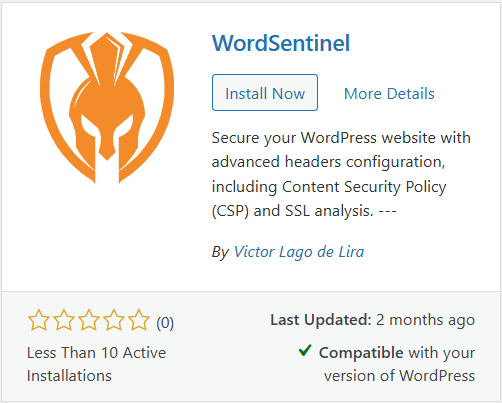
Option 2
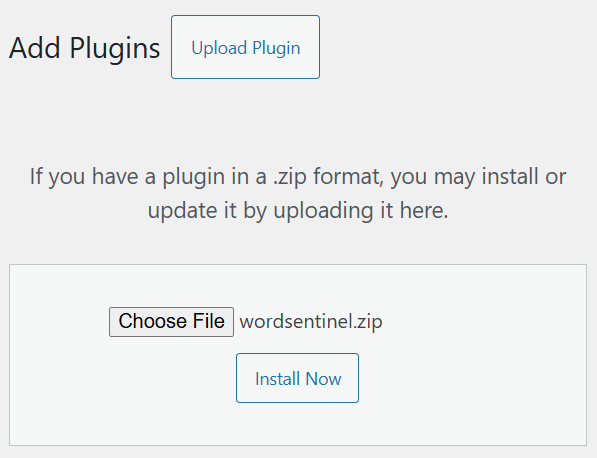

WordSentinel
Protect your WordPress site with powerful CSP headers
Join our growing community of secured WordPress site owners.
Trial
7-day- Discover the power of WordSentinel with a free 3-day trial! Experience advanced security features and see how our plugin elevates your website’s protection.
Premium
Recommended- Protect your website for less than the price of a coffee! Upgrade to WordSentinel Premium today and enjoy everyday security and peace of mind.
Freelancer
_- Join the WordSentinel Affiliate Program and start earning! As a freelancer or agency, you can help clients secure their websites while enjoying the spoils. Partner with us today and turn your expertise into consistent income!
Protect Your WordPress Site with WordSentinel
WordSentinel is a lightweight yet powerful WordPress security plugin that helps safeguard your website by sending modern HTTP security headers. These headers instruct browsers how to handle your content, closing loopholes often exploited by attackers — all without slowing down your site.
Why Security Headers Matter
Most WordPress sites rely only on themes, plugins, and hosting security. But browsers themselves can be powerful allies when properly instructed. That’s where WordSentinel comes in. By enforcing standards like Content-Security-Policy (CSP), Strict-Transport-Security, and X-Frame-Options, your site gains an extra shield against threats such as cross-site scripting (XSS), clickjacking, data injection, and other cross-origin attacks.
Key Features
- Strict-Transport-Security: Forces HTTPS connections.
- Content-Security-Policy (CSP): Whitelists trusted resources, blocking XSS and injection attacks.
- X-Content-Type-Options: Prevents browsers from MIME-sniffing.
- X-Frame-Options: Stops malicious framing (clickjacking).
- Referrer-Policy: Controls how much referral data is shared.
- Permissions-Policy: Restricts access to features like camera, microphone, or geolocation.
- Cross-Origin policies: Adds isolation against cross-site attacks.
- X-XSS-Protection, Expect-CT, Cache-Control: Further harden your site against common exploits.
Free vs Premium
The Free version gives you a strong baseline of protection with essential headers and a real-time security rating powered by Mozilla Observatory. You’ll instantly see how your site scores and where improvements can be made.
The Premium version unlocks advanced protection with:
- Advanced CSP management
- Subresource Integrity (SRI)
- Automated security reports
- Priority updates & support
Designed for Everyone
No technical knowledge is required to benefit from WordSentinel. The plugin applies safe defaults automatically, and upcoming features will even detect and suggest the external resources your site needs in its CSP whitelist. This makes advanced security accessible to both beginners and professionals.
Lightweight and Fast
Unlike heavy security plugins, WordSentinel doesn’t run scans or background tasks. Instead, it configures your server’s headers — a near-zero cost operation. This means your website remains fast, responsive, and efficient while becoming significantly harder to attack.
Take Control of Your Website’s Security
Whether you choose the Free or Premium version, WordSentinel helps you lock down your WordPress site, strengthen browser defenses, and gain visibility into your security posture. With Premium, you unlock expert-level control, automated reports, and priority support — everything you need to stay secure as threats evolve.
Don’t wait until it’s too late — secure your WordPress site today with WordSentinel.
Only logged in customers who have purchased this product may leave a review.
WordSentinel
Frequently Asked Questions
Q1. What does WordSentinel do?
WordSentinel strengthens your WordPress site’s security by automatically sending modern HTTP security headers. These headers instruct browsers how to handle your site’s resources, closing common loopholes that attackers often exploit.
One of the most powerful of these headers is the Content-Security-Policy (CSP). CSP acts like a whitelist for your website, telling browsers exactly which scripts, styles, and resources are safe to load. This makes it extremely effective at blocking cross-site scripting (XSS) and injection attacks — two of the most widespread threats on WordPress sites.
With WordSentinel you can:
-
Use basic CSP rules in the free version to lock down your site with little effort.
-
Unlock advanced CSP customization in the premium version, giving you granular control over trusted domains and third-party scripts.
Beyond CSP, WordSentinel configures many other protective headers, such as:
-
Strict-Transport-Security: Forces HTTPS.
-
X-Frame-Options: Stops clickjacking.
-
X-Content-Type-Options: Prevents MIME sniffing.
-
Referrer-Policy, Permissions-Policy, Cross-Origin policies, and more.
Finally, WordSentinel includes a real-time security dashboard powered by Mozilla Observatory. This provides an independent security rating and recommendations, so you can instantly measure how secure your site really is.
Q2. Does WordSentinel guarantee my site can’t be hacked?
No security plugin can promise absolute protection — and anyone claiming otherwise isn’t being realistic. Cyber threats evolve constantly, and vulnerabilities can appear in themes, plugins, hosting, or even user accounts.
What WordSentinel does is dramatically reduce your attack surface by enforcing strict browser rules through HTTP security headers. This makes many of the most common exploits — such as cross-site scripting (XSS), clickjacking, or malicious injections — much harder to succeed.
Think of WordSentinel as a seatbelt and airbag for your website: it won’t prevent every accident, but it can make the difference between a close call and a disaster. For full protection, you should combine it with other best practices such as:
-
Keeping WordPress, plugins, and themes up to date.
-
Using strong passwords and multi-factor authentication.
-
Regularly backing up your site.
-
Adding a firewall or server-side security solution.
Q3. What is the difference between the free and premium versions?
| Feature | Free | Premium |
|---|---|---|
|
Core security headers (HSTS, X-Frame-Options, X-Content-Type-Options, Referrer-Policy…) |
✅ | ✅ |
|
Basic CSP rules (protect against XSS/injections) |
✅ | ✅ |
| Advanced CSP management | ❌ | ✅ |
| Subresource Integrity (SRI) | ❌ | ✅ |
|
Real-time dashboard (Mozilla Observatory rating) |
✅ | ✅ |
| Automated security reports | ❌ | ✅ |
| Priority updates & support | ❌ | ✅ |
Q4. How do I install WordSentinel?
Option 1 – From the WordPress Plugin Repository (Free version):
- In your WordPress dashboard, go to Plugins → Add New.
- Search for “WordSentinel”.
- Click Install Now, then Activate.
Option 2 – From a ZIP file (Free or Premium version):
- Download the plugin ZIP file from our website or your customer account.
- In your WordPress dashboard, go to Plugins → Add New → Upload Plugin.
- Select the ZIP file (available on the main page), click Install Now, then Activate.
Premium license activation:
If you’ve purchased a premium license, you’ll receive a license key. Enter it under Settings → WordSentinel → License to unlock premium features such as advanced CSP rules and priority support.
Q5. Can I use WordSentinel on multiple websites?
Yes, but it’s one license per domain. We don’t offer a multi-site/bulk license yet.
- One domain = one license: Each production site needs its own license.
- Multiple sites: Purchase multiple licenses (one per domain) from your account.
- Moving domains: You can deactivate a license from the old domain in your account, then activate it on the new domain. Contact support for this kind of request.
If you’re unsure which setup you need, contact us and we’ll help you pick the right number of licenses.
Q6. What happens if my license for WordSentinel expires?
If your license expires, the plugin will continue to work with the last configuration you saved, but:
- You will no longer receive premium updates or new security features.
- Access to premium support will be suspended.
- Advanced options, such as detailed CSP management, may become locked until the license is renewed.
Your website will remain protected with the headers you already configured, but to stay secure against new threats we strongly recommend keeping your license active and updated.
Q7. Will WordSentinel slow down my site?
No. WordSentinel works by sending additional HTTP security headers along with your site’s normal responses. These headers are very lightweight instructions for the browser and have virtually no impact on performance.
Unlike some security plugins that scan content or run heavy background processes, WordSentinel focuses on delivering smart configuration through headers. This means your pages will continue to load just as fast while benefiting from stronger protection.
Q8. Can I break my site by configuring CSP wrong?
Yes, it’s possible. Because the Content-Security-Policy (CSP) header acts like a whitelist, if it’s set too strictly it may block legitimate scripts, styles, or third-party services that your site relies on. This could cause certain features to stop working or even break the layout.
To reduce this risk, WordSentinel provides:
- Safe defaults in the free version, which cover most sites without breaking functionality.
- Guided warnings and clear explanations when settings may become too restrictive.
- Advanced CSP control in the premium version, giving experienced users or developers fine-grained control over what’s allowed.
- Full Support in the premium version, our team is ready to assist you in correctly configuring the advanced CSP headers in case of need.
In short: CSP is powerful and can be strict, but WordSentinel is designed to make it as safe and user-friendly as possible.
Q9. Do I need technical knowledge to use WordSentinel?
No. WordSentinel is designed for non-technical users. It works out of the box with safe defaults—no coding, no server changes.
The only optional step is adding domains to the CSP whitelist when your site loads resources from external services (e.g., analytics, CDNs, fonts). This is a simple “add domain” action in the plugin settings.
Coming soon: WordSentinel will automatically detect external resources used on your site and auto-add or suggest the required CSP entries directly in the admin, eliminating any manual configuration.
Q10. Where can I get support?
- Free version users: You can get community support via the official WordPress.org support forum.
- Premium version users: You have access to priority support directly from our team at Nexsol Technologies. You can open a support request through our store email store@nexsol.tech
Whether you are using the free or premium version, we are committed to helping you get the most out of WordSentinel.
Reviews
There are no reviews yet.